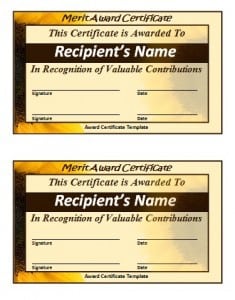
A sample Merit Certificate Template is added here for your reference. Download this Merit Certificate Template free of cost from this page. The certificate issued by an institution to the student for performing well in the examination is known as merit certificate. the details in the merit certificate includes the name of the student, the name of institution, the roll number, and the subjects ,and the signature of examiner and the stamp of institute. This certificate is included in one of the necessary documents a student has in his/her academic career. The certificate is given by an institution to the student in terms of appreciation. The student having merit certificate is eligible for getting a good job. The merit certificate is given by an institution to a student for a specific subject. The subject can be related to science or commerce. The merit certificates are given after the end of session.
What Is a Merit Certificate Template?
A merit certificate template is a ready-made layout used to formally recognize a student or participant for excelling in a specific academic subject, project, or skill-based activity. Unlike a general award certificate, which can celebrate anything from sportsmanship to attendance, a merit certificate is tied specifically to demonstrated academic or skill achievement — top marks in a subject, distinction in a school project, or standout performance in a competition. It also differs from a training completion certificate, which simply confirms that someone finished a course or program regardless of how well they performed. A merit certificate template gives teachers and administrators a professional, pre-formatted document they can quickly personalize with a student’s name, subject, and achievement details, rather than designing one from scratch.
Who Uses a Merit Certificate Template?
Merit certificate templates are used across a wide range of educational and extracurricular settings. Classroom teachers rely on them to recognize students who score highest on a test or consistently excel in a subject like mathematics or science. Schools and academic departments use them at the end of a term or session to formally honor top performers in front of parents and peers. Coaching institutes, tutoring centers, and coding bootcamps use merit certificates to mark standout progress in a specific skill area. Extracurricular organizations — debate clubs, science fairs, art programs, and sports academies — also issue them to spotlight members who performed exceptionally well in a competition or showcase. In each case, the certificate serves the same purpose: giving public, documented credit for a specific, earned achievement.
Download Merit Certificate Template:
Use this download button to download this merit certificate template.

Key Elements Every Merit Certificate Should Include
A well-designed merit certificate template should contain a few essential elements so it reads as an official, credible document rather than a generic printout:
- Student’s full name, spelled correctly and prominently displayed
- Name and logo of the issuing institution or organization
- The specific subject, skill, or activity the merit is awarded for
- Date of issue, and the academic session or term it relates to
- Roll number or student ID, where applicable, for record-keeping
- Signature line for the examiner, teacher, or head of institution
- Official stamp or seal of the institution
- A short line of formal wording, such as “in recognition of outstanding merit in [subject]”
Leaving out any of these can make a certificate look incomplete or unofficial, which undermines the very recognition it’s meant to provide.
How to Customize and Present a Merit Certificate
Turning a downloaded template into a finished certificate only takes a few steps:
- Open the template in a word processor such as Microsoft Word or Google Docs.
- Replace the placeholder name with the student’s full, correctly spelled name.
- Fill in the subject or skill area, the institution’s name, and the relevant academic session.
- Add the roll number or student ID if your institution tracks these.
- Insert the date the certificate is being issued.
- Leave space for a handwritten or digital signature from the examiner or principal, and apply the institution’s official stamp.
- Proofread every field twice — a certificate with a spelling mistake in the student’s name undermines the achievement it celebrates.
- Print on quality certificate paper or cardstock, and consider a simple frame for formal presentations.
- Present it during an assembly, prize distribution, or parent-teacher meeting so the recognition carries real weight in front of peers.
Following these steps consistently ensures every certificate issued looks polished and professional, whether it’s for one student or an entire graduating class.
See More Merit Certificate Templates Here
1. CertificateStreet


2. 123Certificates

3. CreativeCertificates

4. SpeedDownloading

5. Flicker

Common Mistakes to Avoid
- Misspelling the student’s name or subject — always double-check before printing
- Using vague wording like “good job” instead of naming the specific achievement
- Forgetting the date or academic session, which makes the certificate hard to verify later
- Skipping the signature or stamp, which can make the certificate look unofficial
- Reusing the exact same template for every student without adjusting subject-specific details
- Printing on thin paper that doesn’t hold up for framing or long-term keeping
Practical Tips for Issuing Merit Certificates
Keep a simple spreadsheet of who has received a merit certificate, for which subject, and in which session — this avoids duplicate recognition and helps track student progress over time. If your institution issues merit certificates regularly, save a finalized master copy with your logo and formal wording already in place, so future updates only require changing the student’s details. For digital-first classrooms, export the finished certificate as a PDF before sending it home, so formatting doesn’t shift on different devices. Finally, match the certificate’s tone to the occasion — a term-end academic merit certificate can be more formal than one for a small classroom milestone.
Frequently Asked Questions
What is the difference between a merit certificate and an award certificate?
A merit certificate specifically recognizes academic or skill-based achievement, such as top marks in a subject or outstanding performance in a project. An award certificate is broader and can cover things like attendance, sportsmanship, leadership, or participation that aren’t tied to a measurable academic result.
Can I edit these templates in Microsoft Word?
Yes. The templates on this page are provided as editable Word documents, so you can open them directly in Microsoft Word or Google Docs, replace the placeholder text with your student’s details, and print or share the finished certificate.
Do I need special software to customize a merit certificate template?
No special software is required. A standard word processor is enough to add the student’s name, subject, date, and institution details. If you want to design one from scratch, the additional resources linked above offer more advanced, browser-based certificate builders.
How often should merit certificates be issued?
Most schools and institutions issue merit certificates at the end of a term, semester, or academic session, though some award them after specific competitions, projects, or exams. The frequency should match how the achievement is measured, so the certificate remains meaningful rather than routine.